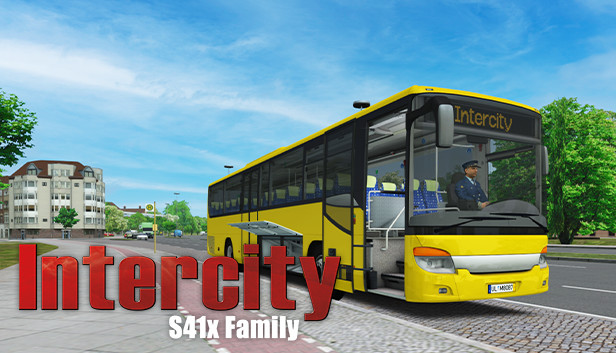
OMSI 2 Add-on S41x Family

Åland Islands, Albania, Algeria, Andorra, Angola, Anguilla, Antigua and Barbuda, Argentina, Armenia, Aruba, Australia, Austria, Azerbaijan, Bahrain, Bangladesh, Barbados, Belarus, Belgium, Belize, Benin, Bermuda, Bhutan, Bolivia, plurinational state of, Bonaire, Sint Eustatius and Saba, Bosnia and Herzegovina, Brazil, Brunei Darussalam, Bulgaria, Burkina Faso, Burma, Burundi, Cambodia, Cameroon, Canada, Cape Verde, Cayman Islands, Central African Republic, Chad, Chile, China, Colombia, Comoros, Congo, Congo, Democratic Republic of the, Cook Islands, Costa Rica, Cote d'Ivoire, Croatia, Cuba, Curaçao, Cyprus, Czech Republic, Denmark, Djibouti, Dominica, Dominican Republic, Ecuador, Egypt, El Salvador, Equatorial Guinea, Eritrea, Estonia, Falkland Islands (Malvinas), Faroe Islands, Fiji, Finland, France, Gabon, Gambia, Georgia, Germany, Gibraltar, Greece, Guadeloupe, Guatemala, Guernsey, Guinea, Guinea-Bissau, Guyana, Haiti, Holy See (Vatican City State), Honduras, Hong Kong, Hungary, Iceland, India, Indonesia, Ireland, Isle of Man, Israel, Italy, Jamaica, Japan, Jersey, Jordan, Kazakhstan, Kenya, Korea, Republic of, Kuwait, Kyrgyzstan, Lao People's Democratic Republic, Latvia, Lebanon, Lesotho, Liberia, Liechtenstein, Lithuania, Luxembourg, Macao, Madagascar, Malawi, Malaysia, Maldives, Mali, Malta, Marshall Islands, Martinique, Mauritania, Mauritius, Mayotte, Mexico, Micronesia, Federated States of, Moldova, Monaco, Mongolia, Montenegro, Montserrat, Morocco, Mozambique, Namibia, Nepal, Netherlands, New Zealand, Nicaragua, Niger, Niue, Northern Mariana Islands, Norway, Oman, Palestinian Territory, Occupied, Papua New Guinea, Paraguay, Peru, Philippines, Poland, Portugal, Qatar, Republic of North Macedonia, Romania, Russian Federation, Rwanda, Saint Kitts and Nevis, Saint Lucia, Saint Martin (French Part), Saint Vincent and the Grenadines, San Marino, Senegal, Serbia, Seychelles, Sierra Leone, Singapore, Sint Maarten, Slovakia, Slovenia, Solomon Islands, Somalia, South Africa, South Sudan, Spain, Sudan, Suriname, Svalbard and Jan Mayen, Swaziland, Sweden, Switzerland, Taiwan, Province of China, Tajikistan, Tanzania, United Republic Of, Thailand, Timor-Leste, Togo, Tonga, Turkey, Turkmenistan, Uganda, Ukraine, United Arab Emirates, United Kingdom, United States, Uruguay, Uzbekistan, Venezuela, Vietnam, Western Sahara, Zambia, Zimbabwe
Game Description
System Requirements
Activation Details
Get ready to drive one of the most iconic buses in intercity routes from the 2010‘s!
The S41x family is a range of high floor buses built for intercity and medium-distance lines that was in production between 2006 and 2020. It has seen a great amount of success all over Europe, alongside its sister buses from Evobus. During the production run, this family has seen one major facelift, modernizing the dashboard and redesigning the interior, as well as changing the engine offer to include Euro-VI compliant engines.
The family is equipped with the 7.7 liter, inline 6 OM936 turbocharged diesel engine - capable of producing from 220 kW to 260 kW - mated to a 6-speed manual GO190-6 gearbox with retarder.
This OMSI 2 add-on allows you to drive buses in both pre-facelift (UL) and facelift (Business) variants, as well as having three length configurations to choose from for each. All of the buses come equipped with a modern AK0139 digital ticket printer and LAWO Compact destination display controller. It is also possible to add customization options, such as hubcaps and different models of seats.
FEATURES
- Six different bus models
- Fully modelled UL and Business variants
- Three available lengths
- Accurate simulation of the AK0139 ticket machine
- LAWO Compact destination controller
- Integrated air conditioning controls
- Visual customization: hubcaps, passenger seats, roof hatches
- Repaint kit included for easy livery creation
Aerosoft GmbH
Lindberghring 12
D-33142 Büren, Germany
To activate the game, you need a Steam Account
-
Login or register at the official
Steam Website and download Steam client - Install and start application, login with your Account name and Password
- Click the Games Menu.
- Choose Activate a Product on Steam...
- Follow the onscreen instructions to complete the process
- After the successful code verification, go to the "MY GAMES" tab and start downloading.