This content requires the base game in order to play:OMSI 2
Game Description
System Requirements
Activation Details
Even more variety in OMSI2 by more AI people and bus drivers!
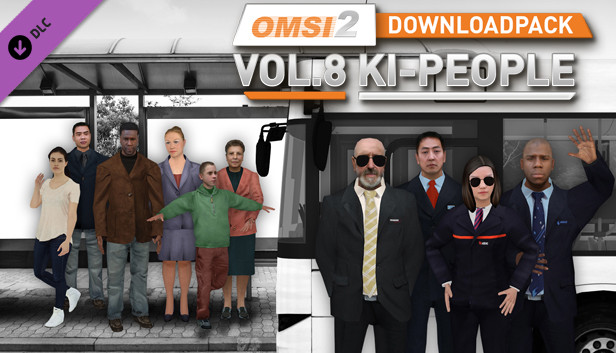
In the 8th part of the OMSI2 Downloadpack series the variety becomes even bigger, because more AI people are waiting to be released into the maps.
In addition, the package offers new bus drivers.
The new AI people - 3 women, 2 men and a child - are available in 50 variants in terms of clothing and appearance and, as always, have more than 200 professionally recorded language files in German and English.
They are not only suitable for German maps but also bring authenticity to English-speaken OMSI-Fans.
The new bus drivers provide more variety in the cockpit.
We follow the wishes of the OMSI community and therefore there are drivers for the following transport companies:
MVG München (Munich)
Vestische Herten
WSW Wuppertal
BVG Berlin
HVV Hamburg Hochbahn
ASEAG Aachen
All drivers come in total with 20 variations of appropriate uniforms. This makes every map even more realistic.
If you like, you can also use the new drivers as normal passengers.
The OMSI 2-Downloadpack Vol. 8 does not only contain new passengers for your OMSI-Map, also your buses will be driven by the new staff.
NOTE: For use on existing OMSI maps, the AI people of the OMSI Download Pack Vol. 8 must be manually integrated into the maps. <
Please follow the instructions.
For copyright reasons, the distribution of the AI people of the OMSI2 download pack Vol. 8 individually or together with free maps is not permitted.
Processor: Dual-Core, e.g. Core i5 with 2.8 GHz or comparable
Memory: 4 GB RAM
Graphics: 3D graphics card with at least 2,048 MB
Storage: 10 GB available space
Directx: Version 9.0c
Sound card: Yes
Additional notes: * Starting January 1st, 2024, the Steam Client will only support Windows 10 and later versions.
windows Recommended
OS: Windows 8 / 8.1 / 10 / 11 (64-bit)
Processor: Quad-Core with 3.0 GHz
Memory: 8 GB RAM
Graphics: GeForce or comparable AMD with 1024 MB
Directx: Version 9.0c
To activate the game, you need a Steam Account
Login or register at the official Steam Website and download Steam client
Install and start application, login with your Account name and Password
Click the Games Menu.
Choose Activate a Product on Steam...
Follow the onscreen instructions to complete the process
After the successful code verification, go to the "MY GAMES" tab and start downloading.
News & Updates
2026-07-31
The Summer Sale Returns: Bigger Deals for 48 Hours Only
Summer is here and we are already preparing for a super fresh season full of incredible delights and heated moments! Make an order of over 15€ between 31.07.2026 13:00 CET and 02.08.2026 15:00 CET and you will get our special SUMMER DEALS GIFT, which will contain one of the following: discount codes - 10% OFF, 20% OFF, 25% OFF or 50% OFF; discount vouchers - 1€, 2€, 5 or 10€; or a FREE GAME…
Great games are nothing without loyal gamers and we're grateful to have such an amazing community that supports our store. That’s why we’re launching our special “YUPLAY Is Feeling Generous” campaign as a way of saying “Thank you”. During this campaign, with every order over €30 you will receive a free 10% discount code that can be used during your next purchase…