This content requires the base game in order to play:OMSI 2
Game Description
Activation Details
Traffic in OMSI 2 is getting a major upgrade – and we mean that quite literally!
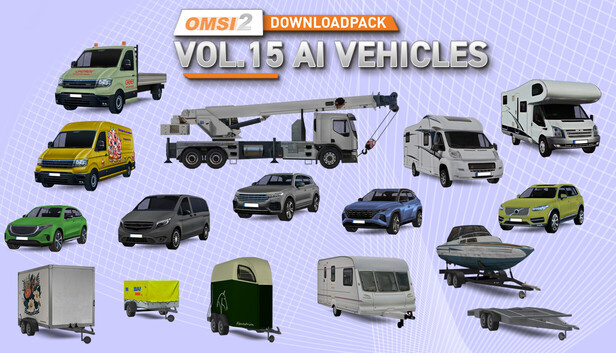
For the first time ever, AI vehicles with trailers are joining the streets with Downloadpack Vol. 15, bringing fresh variety and new possibilities to your maps.
From nimble cars with small cargo trailers, rugged SUVs towing horse or boat trailers, and spacious camper combos to versatile transport vans – this pack delivers a rich mix of vehicle types that will make your virtual cityscapes feel even more dynamic and realistic.
A special highlight is the highly detailed crane truck, available both as an AI vehicle and as a static object in two different positions, a real eye-catcher for construction sites and industrial zones.
All vehicles and trailers come in various color schemes and feature semi-fictional company logos, helping to create believable urban traffic scenarios full of character.
Creative minds can go even further: with the included repaint templates, you can design your own liveries and customize the city streets to your liking.
More variety, more life! This Downloadpack takes OMSI’s AI traffic to the next level.
Please note: AI vehicles must be manually added to your maps (OMSI does not place them automatically). A setup guide is included with the pack.
Features
Wide range of vehicles: cars, SUVs, vans, platform lorry and motorhomes
Various trailers: tarp trailers, horse and boat trailers, box trailers, car trailers, and caravans
Impressive crane truck: available as a driving AI vehicle and as static objects in multiple configurations
Numerous repaints with fictional company logos
Repaint templates for creating your own designs
Static models for map construction
Authentic sound effects for a realistic audio atmosphere
Please note: Long vehicle-trailer combinations may cause issues on narrow maps or tight curves. For tighter turns, consider using shorter vehicles.
Login or register at the official Steam Website and download Steam client
Install and start application, login with your Account name and Password
Click the Games Menu.
Choose Activate a Product on Steam...
Follow the onscreen instructions to complete the process
After the successful code verification, go to the "MY GAMES" tab and start downloading.
News & Updates
2026-09-02
Get 50 Extra YXP for a Limited Time
Ready to level up your YUPLAY Loyalty progress? The YXP Extra Event is back, giving you another chance to earn 50 bonus YXP with every qualifying order. Spend at least €10 between 02.09.2026 15:00 CET and 07.09.2026 15:00 CET and get an extra 50 YXP on top of your regular Loyalty Program rewards!
ACE COMBAT 8 Could Be the Series’ Most Ambitious Entry
The upcoming Ace Combat 8: Wings of Theve marks a completely new chapter in the popular flight shooting series, by effectively blending cinematic storytelling with the thrills of aerial combat like never before. Developed by Bandai Namco Aces Inc., the game will build upon the decades of established expertise in order to further boost the series’ strong sides…