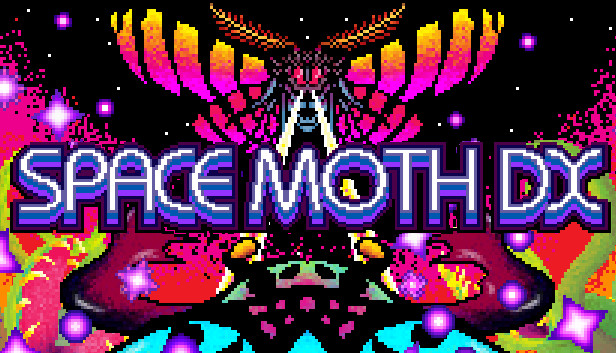
Space Moth DX

Åland Islands, Albania, Algeria, Andorra, Angola, Anguilla, Antigua and Barbuda, Argentina, Armenia, Aruba, Australia, Austria, Azerbaijan, Bahrain, Bangladesh, Barbados, Belarus, Belgium, Belize, Benin, Bermuda, Bhutan, Bolivia, plurinational state of, Bosnia and Herzegovina, Brazil, Brunei Darussalam, Bulgaria, Burkina Faso, Burma, Burundi, Cambodia, Cameroon, Canada, Cape Verde, Cayman Islands, Central African Republic, Chad, Chile, China, Colombia, Comoros, Congo, Congo, Democratic Republic of the, Cook Islands, Costa Rica, Cote d'Ivoire, Croatia, Cuba, Curaçao, Cyprus, Czech Republic, Denmark, Djibouti, Dominica, Dominican Republic, Ecuador, Egypt, El Salvador, Equatorial Guinea, Eritrea, Estonia, Falkland Islands (Malvinas), Faroe Islands, Fiji, Finland, France, Gabon, Gambia, Georgia, Germany, Gibraltar, Greece, Guadeloupe, Guatemala, Guernsey, Guinea, Guinea-Bissau, Guyana, Haiti, Holy See (Vatican City State), Honduras, Hong Kong, Hungary, Iceland, India, Indonesia, Ireland, Isle of Man, Israel, Italy, Jamaica, Japan, Jersey, Jordan, Kazakhstan, Kenya, Korea, Republic of, Kuwait, Kyrgyzstan, Lao People's Democratic Republic, Latvia, Lebanon, Lesotho, Liberia, Liechtenstein, Lithuania, Luxembourg, Macao, Madagascar, Malawi, Malaysia, Maldives, Mali, Malta, Marshall Islands, Martinique, Mauritania, Mauritius, Mayotte, Mexico, Micronesia, Federated States of, Moldova, Monaco, Mongolia, Montenegro, Montserrat, Morocco, Mozambique, Namibia, Nepal, Netherlands, New Zealand, Nicaragua, Niger, Niue, Northern Mariana Islands, Norway, Oman, Papua New Guinea, Paraguay, Peru, Philippines, Poland, Portugal, Qatar, Republic of North Macedonia, Romania, Russian Federation, Rwanda, Saint Kitts and Nevis, Saint Lucia, Saint Martin (French Part), Saint Vincent and the Grenadines, San Marino, Senegal, Serbia, Seychelles, Sierra Leone, Singapore, Sint Maarten, Slovakia, Slovenia, Solomon Islands, Somalia, South Africa, South Sudan, Spain, Sudan, Suriname, Svalbard and Jan Mayen, Swaziland, Sweden, Switzerland, Taiwan, Province of China, Tajikistan, Tanzania, United Republic Of, Thailand, Timor-Leste, Togo, Tonga, Turkey, Turkmenistan, Uganda, Ukraine, United Arab Emirates, United Kingdom, United States, Uruguay, Uzbekistan, Venezuela, Vietnam, Western Sahara, Zambia, Zimbabwe
Game Description
System Requirements
Activation Details
Space Moth DX
Space Moth DX is the original PC edition of 1CC Games' intense arcade shoot 'em up, with a brand new DX Mode that will put even veteran bullet dodging skills to the test! Beginners are catered for as well, with a rebalanced Arcade Mode that's just right for anyone looking to get started with bullet hell games.
Laser Insecticide
Fact: everything is better with lasers. So we put lasers on over 30 angry giant insects who want to stop you, Space Moth, from escaping Earth and going to the Moon. Show them who's boss and blast your way into space!
Ultimate Control
Eight directions. Three buttons. Keyboard, controller and arcade stick support. The freedom to remap any setup as you please. Jump straight into the game without having to worry about finger gymnastics!
Satisfying Scoring
Batter the bad guys with a missile barrage until they turn neon, then finish them off with your super laser for a massive bonus! But be careful: neon enemies are much more aggressive!
Tough Love
Space Moth will challenge you, fiercely. But Space Moth also wants to help you improve, so you can overcome those challenges. Your current condition (position, bombs and lives remaining) will be saved at the start of each stage and boss fight. Then if you lose all of your lives, you will be given the option to return to the condition recorded in the most recent save. But be warned: your score will be reset!
Prog Rock Prodigy
Space Moth mixes up the indie game music scene with a soundtrack that's less NES chiptune or Amiga tracker, and more Tangerine Dream.
Proper Pixel Art
When was the last time most indie graphics artists sat down and played a game on a real CRT? For 1CC games, the answer is today. So you won't find any mixed-resolution assets or showy shader effects, just proper pixel art!
To activate the game, you need a Steam Account
-
Login or register at the official
Steam Website and download Steam client - Install and start application, login with your Account name and Password
- Click the Games Menu.
- Choose Activate a Product on Steam...
- Follow the onscreen instructions to complete the process
- After the successful code verification, go to the "MY GAMES" tab and start downloading.