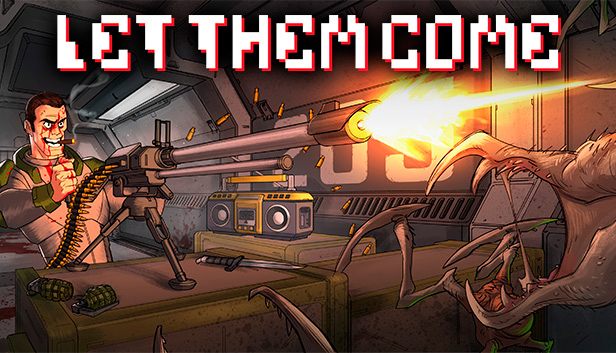
Let Them Come is a fast paced pixel art shoot ‘em up. Twitchy trigger fingers and focused battle tactics are the order of the day as wave after wave of alien-like creatures try to take you down. Gameplay is simple to pick up but hard to master - only the best of the best will survive to fight another day. With a variety of alien creatures to mow down and cool weapons to do it with, stylish retro backdrops and a hard rockin’ soundtrack, Let Them Come is a fast and furious pixel style shooter on steroids
Key Features:
LOADOUT CUSTOMIZATION - Upgrade and customize your arsenal as you unlock new items to take down the hordes!
UNRELENTING ONSLAUGHT - Combat an endless stream of diverse enemies with cunning attack mechanics.
BOOMBOX - Rock out to the music of your choice as you unleash hell fire on the enemy and collect new mixtapes as you go.
DYNAMIC LIGHTING – Use tracer fire and explosions tactically to help target the oncoming targets in darker levels
FEROCIOUS BOSS BATTLES - Face grim odds against terrifying boss creatures in the ultimate level showdown!
ONLINE LEADERBOARDS – Show off your shooter prowess and boast with friends as you climb to the top of the ladder and become the best of the best!
Additional notes: This game is locked to 30 frames per second.
windows Recommended
OS: Windows XP or later
Processor: 2Ghz+
Memory: 2048 MB RAM
Graphics: 1GB
Storage: 500 MB available space
Additional notes: This game is locked to 30 frames per second.
macosx Minimum
OS: Mac OS X 10.7 or later
Processor: 1.2Ghz+
Memory: 1024 MB RAM
Graphics: 512MB
Storage: 250 MB available space
Additional notes: This game is locked to 30 frames per second.
macosx Recommended
OS: Mac OS X 10.7 or later
Processor: 2Ghz+
Memory: 2048 MB RAM
Graphics: 1GB
Storage: 500 MB available space
Additional notes: This game is locked to 30 frames per second.
To activate the game, you need a Steam Account
Login or register at the official Steam Website and download Steam client
Install and start application, login with your Account name and Password
Click the Games Menu.
Choose Activate a Product on Steam...
Follow the onscreen instructions to complete the process
After the successful code verification, go to the "MY GAMES" tab and start downloading.
News & Updates
2026-10-23
BOO! Giveaway - Win a Game of Your Choice
Make a purchase of any amount between 23.10.2026 15:00 CET and 28.10.2026 15:00 CET, submit your Order ID in our Gleam and get a chance to win a FREE GAME (up to 50€).…
Some functionality is not accessible when using the default controller configuration, requiring use of the touchscreen or virtual keyboard, or a community configuration
This game does not default to external Bluetooth/USB controllers on Deck, and may require manually switching the active controller via the Quick Access Menu
This game shows Steam Deck controller icons
In-game interface text is legible on Steam Deck
This game's default graphics configuration performs well on Steam Deck