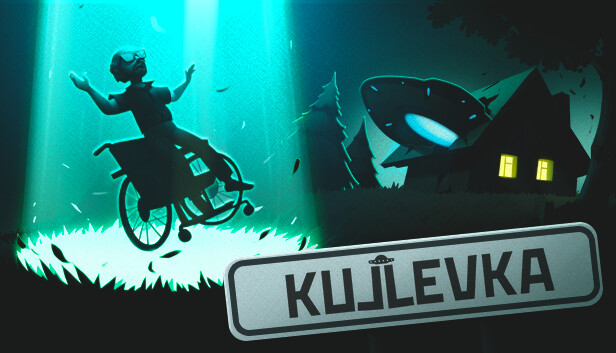
Russia, 1992. The ordinary village of Kujlevka is no stranger to challenging times. In this dark and otherworldly period of Russian history, the current financial crisis and rising crime rates appear bleak in comparison. And when a flying saucer crashes into local chairman's house, it’s up to you to meet the aliens. Of all the locations on Earth, this forgotten settlement becomes a bustling center for science, exploration, and the supernatural; you’re merely the poor chap whose home became the saucer’s crash site.
Assuming the role of the collective farm’s headmaster, you must filter visitors before let them inside the UFO. These guests from outer space are in no hurry to interact with humans, they’d much rather steadily observe our species and our vast dreams and desires. What exactly might these extraterrestrial beings have planned?
WE COME IN PEACE
This isn’t your stereotypical alien encounter. You will be tasked to learn about these otherworldly beings before they can properly study you.
MALE YOUR OWN STORY!
Kujlevka lets you play a role in charting a course through a financially and politically turbulent time in Russian history.
EXPLORE AND UNCOVER
Beyond static dialog and walls of text, you can explore village life in Kujlevka through a mesmerizing atmosphere of the protagonist’s dreams.
windows Minimum
OS: Windows 7 and higher, 64 bit
Processor: Intel Core i5
Memory: 4 GB RAM
Graphics: GeForce GTX 650
Storage: 3 GB available space
Directx: Version 11
Additional notes: * Starting January 1st, 2024, the Steam Client will only support Windows 10 and later versions.
windows Recommended
OS: Windows 10 64-bit
Processor: Intel Core i7
Memory: 4 GB RAM
Graphics: Geforce GTX 1080
Storage: 4 GB available space
Directx: Version 11
To activate the game, you need a Steam Account
Login or register at the official Steam Website and download Steam client
Install and start application, login with your Account name and Password
Click the Games Menu.
Choose Activate a Product on Steam...
Follow the onscreen instructions to complete the process
After the successful code verification, go to the "MY GAMES" tab and start downloading.
News & Updates
2026-04-27
30 Years of Fear: Celebrating the Legacy of Resident Evil
It has been 3 whole decades of zombie survival horror since the Resident Evil series started and we decided to cover the most recent developments in the CAPCOM masterpiece that is synonyms with all kinds of deadly and gory heart-stopping experiences that would make you chill every time you decide to partake in it! Originally titled Biohazard (in Japan), the Resident Evil franchise spans across multiple…
From Wishlist to Courtroom: The Steam Lawsuits Explained
There have been numerous Steam court case lawsuits throughout the years and ever since the start of the year they have made the pile even bigger! We decided to check out some of the latest accusations against the popular gaming platform as well as go through some of the previous cases that caused a stir of Valve legal issues in the past! Gabe Newell and Valve have definitely not been strangers to the court system…
This game does not support cross-platform saved games
This game does not default to external Bluetooth/USB controllers on Deck, and may require manually switching the active controller via the Quick Access Menu
All functionality is accessible when using the default controller configuration
This game shows Steam Deck controller icons
In-game interface text is legible on Steam Deck
This game's default graphics configuration performs well on Steam Deck