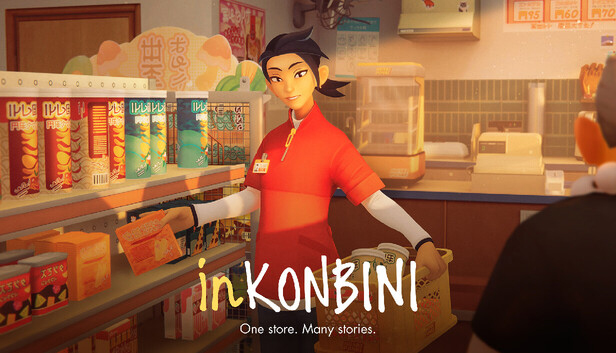
inKONBINI: One Store. Many Stories is a cozy, narrative-driven slice-of-life game with light simulation elements, centered on human connection and everyday moments.
Play as Makoto Hayakawa, a college student spending her summer behind the counter of a small-town convenience store, in a colorful world inspired by early 1990s Japan.
Your days are shaped by simple, tactile actions. You stock shelves, tidy displays, and prepare the store for customers, not to optimize numbers, but to settle into a comforting rhythm. Between tasks, you explore the store and its surroundings, notice tiny details, and connect with regulars whose lives gently intertwine with yours.
Through branching conversations and meaningful choices, your interactions shape relationships and reveal intimate stories of a close-knit neighborhood.
Key Features
A Cozy, Routine-Driven Store Experience
Engage in light storekeeping activities like stocking items, organizing shelves, and ordering goods. These moments create a calming flow that supports exploration and storytelling rather than complex management.
Narrative Focused Interactions
Experience branching dialogue and meaningful choices as you learn about the lives, routines, and secrets of your customers.
Nostalgic Early 1990s Atmosphere
Immerse yourself in a Japan-inspired setting with soft visuals, warm lighting, and lovingly crafted details that evoke comfort and familiarity.
Toy Capsule Surprises
Collect and discover charming capsule toys from the store’s gachapon machine. Each capsule holds a small surprise, adding moments of delight and curiosity to your daily routine and inviting you to uncover every little treasure inside.
Soothing ASMR Inspired Soundscape
Enjoy a peaceful ASMR-like soundscape filled with subtle everyday sounds that enhance relaxation and presence.
Additional notes: Based on High/Ultra graphics settings. Dedicated GPU required, SSD recommended.
macosx Minimum
OS: macOS 10.13 (High Sierra) or later
Processor: Apple M1
Memory: 8 GB RAM
Graphics: M1 or for Intel Macs
Storage: 3.2 GB available space
macosx Recommended
OS: macOS Monterey
Processor: M1Pro
Memory: 16 GB RAM
Graphics: dedicated GPU with 4GB video RAM or more
Storage: 3.2 GB available space
To activate the game, you need a Steam Account
Login or register at the official Steam Website and download Steam client
Install and start application, login with your Account name and Password
Click the Games Menu.
Choose Activate a Product on Steam...
Follow the onscreen instructions to complete the process
After the successful code verification, go to the "MY GAMES" tab and start downloading.
News & Updates
2026-09-17
Celebrate Fall and Collect Your Free Game Drop
Summer is over and the new gaming season starts with a blast at YUPLAY, so for this occasion we decided to bring you a massive storewide promotion with a surprise FREE game as a gift from us. All you have to do to participate is make an order over 9.99€ between 17.09.2026 15:00 CET and 21.09.2026 15:00 CET, and you will get your FREE game together with the ones you have purchased…
Ready to level up your YUPLAY Loyalty progress? The YXP Extra Event is back, giving you another chance to earn 50 bonus YXP with every qualifying order. Spend at least €10 between 02.09.2026 15:00 CET and 07.09.2026 15:00 CET and get an extra 50 YXP on top of your regular Loyalty Program rewards!