Can be activated in:
Åland Islands, Albania, Algeria, Andorra, Angola, Anguilla, Antigua and Barbuda, Argentina, Armenia, Aruba, Australia, Austria, Azerbaijan, Bahrain, Bangladesh, Barbados, Belarus, Belgium, Belize, Benin, Bermuda, Bhutan, Bolivia, plurinational state of, Bonaire, Sint Eustatius and Saba, Bosnia and Herzegovina, Bouvet Island, Brazil, British Indian Ocean Territory, Brunei Darussalam, Bulgaria, Burkina Faso, Burma, Burundi, Cambodia, Cameroon, Canada, Cape Verde, Cayman Islands, Central African Republic, Chad, Chile, China, Christmas Island, Cocos (Keeling) Islands, Colombia, Comoros, Congo, Congo, Democratic Republic of the, Cook Islands, Costa Rica, Cote d'Ivoire, Croatia, Cuba, Curaçao, Cyprus, Czech Republic, Denmark, Djibouti, Dominica, Dominican Republic, Ecuador, Egypt, El Salvador, Equatorial Guinea, Eritrea, Estonia, Falkland Islands (Malvinas), Faroe Islands, Fiji, Finland, France, French Guiana, French Polynesia, French Southern Territories, Gabon, Gambia, Georgia, Germany, Gibraltar, Greece, Greenland, Grenada, Guadeloupe, Guatemala, Guernsey, Guinea, Guinea-Bissau, Guyana, Haiti, Heard Island and McDonald Islands, Holy See (Vatican City State), Honduras, Hong Kong, Hungary, Iceland, India, Indonesia, Ireland, Isle of Man, Israel, Italy, Jamaica, Japan, Jersey, Jordan, Kazakhstan, Kenya, Kiribati, Korea, Republic of, Kuwait, Kyrgyzstan, Lao People's Democratic Republic, Latvia, Lebanon, Lesotho, Liberia, Liechtenstein, Lithuania, Luxembourg, Macao, Madagascar, Malawi, Malaysia, Maldives, Mali, Malta, Marshall Islands, Martinique, Mauritania, Mauritius, Mayotte, Mexico, Micronesia, Federated States of, Moldova, Monaco, Mongolia, Montenegro, Montserrat, Morocco, Mozambique, Namibia, Nauru, Nepal, Netherlands, New Caledonia, New Zealand, Nicaragua, Niger, Niue, Norfolk Island, Northern Mariana Islands, Norway, Oman, Palau, Palestinian Territory, Occupied, Papua New Guinea, Paraguay, Peru, Philippines, Pitcairn, Poland, Portugal, Qatar, Republic of North Macedonia, Reunion, Romania, Russian Federation, Rwanda, Saint Barthélemy, Saint Helena, Ascension And Tristan Da Cunha, Saint Kitts and Nevis, Saint Lucia, Saint Martin (French Part), Saint Pierre and Miquelon, Saint Vincent and the Grenadines, San Marino, Sao Tome and Principe, Senegal, Serbia, Seychelles, Sierra Leone, Singapore, Sint Maarten, Slovakia, Slovenia, Solomon Islands, Somalia, South Africa, South Georgia and the South Sandwich Islands, South Sudan, Spain, Sudan, Suriname, Svalbard and Jan Mayen, Swaziland, Sweden, Switzerland, Taiwan, Province of China, Tajikistan, Tanzania, United Republic Of, Thailand, Timor-Leste, Togo, Tokelau, Tonga, Turkey, Turkmenistan, Turks and Caicos Islands, Tuvalu, Uganda, Ukraine, United Arab Emirates, United Kingdom, United States, United States Minor Outlying Islands, Uruguay, Uzbekistan, Vanuatu, Venezuela, Vietnam, Virgin Islands, British, Wallis and Futuna, Western Sahara, Zambia, Zimbabwe
Delivery:
Instant Delivery
Game Details
Operating System:PC
Release Date:May 04, 2021
Product type:DLC
Supported languages:
English, French, German, Japanese, Polish, Russian, Simplified Chinese, Spanish, Swedish
This content requires the base game in order to play:Generation Zero®
Game Description
System Requirements
Activation Details
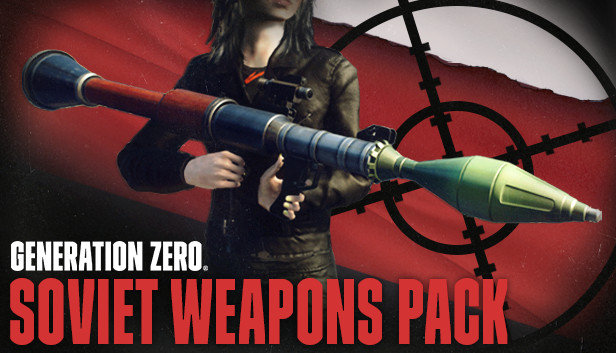
The Östertörn survivors are no longer the only ones fighting the war against FNIX. Soviet soldiers in small and specialized forces have been seen in the northern regions using moveable defenses to set up temporary camps. They seem to be fighting the machines, but does that make them allies, or do they have their own motives for entering Swedish territory?
The budding Resistance in Östertörn has come across several dead Soviet soldiers, armed with specialized USSR weapons that can be of great use to the Resistance as they learn to use them in the fight against FNIX.
Mid-tier versions of these three Soviet weapon models will be available in any PLUNDRA storage box in Östertörn. If you’re new to the game, you will find them in the storage box at the Iboholmen Church. For the higher-tiered versions, you will have to take the fight to the machines and loot the weapons from their wreckage.
These weapons are
Kotenok Sniper Rifle - This iconic semi-automatic designated marksman rifle is one of the most common weapons in the USSR. Deployed in a similar way as a machine gun, it can suppress an area with accurate gunfire, keeping your enemies at bay.
AT-WAD Assault Rifle - Used by special forces such as the Spetsnaz, this silenced automatic rifle features an integrated suppressor, allowing you to shoot more shots before potentially being discovered by your enemy.
RLG-7 (Rocket Launcher) - One of the most recognizable and widespread rocket-propelled grenade systems ever produced, the RGP-7 is as Soviet as they come. Utilized to fight armoured and fortified positions in almost every conflict since its creation, it should be perfect for taking down robots as well.
Graphics: nVidia GTX 660 / ATI HD7870 - 2GB VRAM / Intel® Iris™ Pro Graphics 580
Storage: 35 MB available space
windows Recommended
OS: 64bit OS - Windows 10
Processor: Intel i7 Quad Core
Memory: 16 GB RAM
Graphics: nVidia GTX 960 / R9 280 - 4GB VRAM
Storage: 35 MB available space
To activate the game, you need a Steam Account
Login or register at the official Steam Website and download Steam client
Install and start application, login with your Account name and Password
Click the Games Menu.
Choose Activate a Product on Steam...
Follow the onscreen instructions to complete the process
After the successful code verification, go to the "MY GAMES" tab and start downloading.
News & Updates
2025-07-09
Little Nightmares III: Terrifying New Worlds Revealed in Latest Showcase
Welcome back, little Visitor. It has been some time since you were last in this grim world, but we are delighted to see you return to the Spiral, eager to uncover the secrets behind one of the most haunting amusements that you are going to encounter in the upcoming Little Nightmares III release, since this time is a bit more mysterious, but still very much an atmospheric adventure game that would take you on the rather dark and twisted journey…
We are already at the end of the second quarter for the year and the summer is already giving us so many updates and cool information on a lot of gaming titles and events. We tried our best to gather some of the more exciting pieces, although it is quite difficult to contain everything in just one single post as there is simply so much to talk of. We kick-off things with as many of the highlights from one of the most important gaming events of the year…