This content requires the base game in order to play:
Fortnite
Game Description
System Requirements
Activation Details
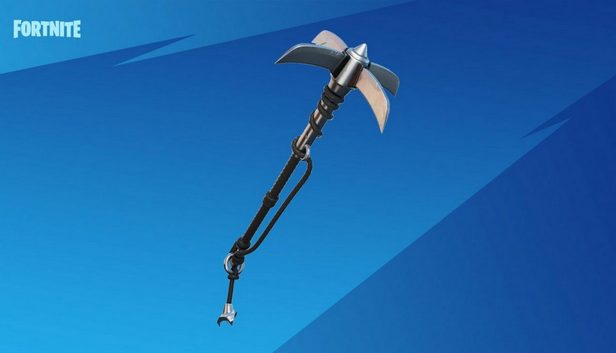
Fortnite - Catwoman's Grappling Claw Pickaxe DLC Epic Games Key is up for grabs for everyone that wants it! While at first, you were only able to get it by buying the DC Zero Point comic and redeeming the code provided on it, now it’s available to all Fortnite enthusiasts that want to customize their character with exclusive DC-themed gear.
Get this cosmetic customization option for yourself and enter the battle arena in style with Catwoman's Grappling Claw Harvesting Tool which was previously only available as a DC promotional item. These cosmetic elements are one of the best aspects of Fortnite because they add a lot of variety, as well as self-expression to this battle royale experience, and the Catwoman's Grappling Claw item is definitely no exception. Buy this DC Fortnite Pickaxe - don’t miss this great chance to enjoy the game to the fullest!
Utilize exclusive Catwoman gear
Give your character a more unique appearance with Catwoman's Grappling Claw Pickaxe and immerse yourself into the world of Fortnite. The game features three modes: Save the World, Creative and the most popular of the bunch – Battle Royale. Play Solo or form a squad with friends and fight on the remote island until only you remain alive. Enjoy a game with a rewarding progression system, a variety of content, and unique building mechanics inspired by games like Minecraft. While Fortnite’s stylish cartoony graphics are reminiscent of games like Overwatch or Team Fortress 2, cosmetic items, like the one included in Fortnite - Catwoman's Grappling Claw Pickaxe Epic Games key, truly bring the game to life like nothing else!
windows Minimum
OS: Windows 10 64-bit version 1703
Processor: Core i3-3225 3.3 GHz
Memory: 8 GB RAM
Graphics: Intel HD 4000
windows Recommended
OS: Windows 10/11 64-bit
Processor: Intel Core i7-8700, AMD Ryzen 7 3700x or equivalent
Memory: 16 GB RAM or higher
Graphics: Nvidia RTX 3070, AMD Radeon RX 6700 XT, or equivalent GPU; 8 GB VRAM or higher
Storage: NVMe Solid State Drive
To activate the game, you need an Epic Games Account
Login or register at the official Epic Games Store and download Epic Games Store client
Download the Epic Games Launcher by clicking on the blue button on the top right corner of your screen.
Once installed, launch it and log in or sign.
On the top right corner, click on your avatar and then on “Redeem Code”
Redeem the code you purchased on Yuplay
Come back to the “Library” tab. Your new game is available and ready to install.
News & Updates
2026-03-30
Monthly Recap - March Edition
Early Spring season has definitely delivered on some exciting updates, game announcements, and promising releases to be on the lookout for until the end of this year. So, let’s immediately have a better look at some of the more outstanding news that happened on the gaming scene during the month of March 2026 that we decided to cover for you…
Does The Upcoming Silent Hill: Townfall Fit in The Series
In February there was another edition of the Silent Hill transmission showcase series hosted by KONAMI and we purposefully waited a bit before covering that one, since it was mainly concerned with the upcoming Silent Hill: Townfall release, in which the leading producer for the series Mr. Matoi Okamoto shed more light on the development and updates around the upcoming next game in the Silent Hill series.