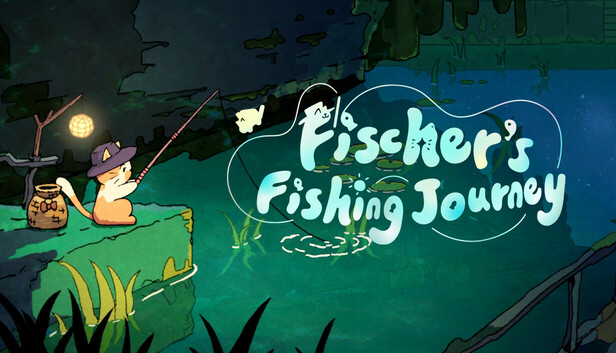
Welcome to "Fischer's Fishing Journey"! Set Fischer on your desktop to be your best work and study companion. Whether you run the game as a live wallpaper with Fischer quietly fishing in a cozy corner or pin it up on your screen, he's here to brighten every day. With dynamic backdrops that shift from day to night and weather that changes from sunny to rainy, you'll be immersed in a soothing environment complete with gentle breezes and the soft murmur of flowing water—adding a touch of tranquility to your busy routine.
Take a break from the hustle and join Fischer on a little journey to explore diverse landscapes across the globe. Marvel at unique natural sceneries and enjoy a leisurely, laid-back fishing experience.
Forget complicated controls—Fischer handles all the fishing fuss for you! Just check your bait and fish basket during your downtime and relish the laid-back fun of fishing. Your catches can be sold or kept in your tank to earn Fish Coins, which let you buy more bait, upgrade your rod, expand your tank, and unlock a host of unique fish and fresh fishing spots!
Your fishing haul is shaped by the location, time, weather, and even the bait you choose. From common fish to mysterious, rare species, dozens of unique types are just waiting for you to discover and collect!
Drop your catches into your personal fish tank and sit back to watch them swim gracefully. Not only does it look cool, but your tank also earns you extra rewards. Upgrade and expand your tank to create an even richer underwater world!
On your journey, you'll meet all kinds of new characters and get the chance to chat with them and hear their stories. Help your new pals fulfill their wishes and uncover long-forgotten tales on this planet—discovering the warmth and surprises hidden behind its tranquil vistas.
windows Minimum
OS: Windows 10 / Windows 11
Processor: Intel® Core™ i3 @ 3.2 GHZ
Memory: 4 GB RAM
Storage: 256 MB available space
To activate the game, you need a Steam Account
Login or register at the official Steam Website and download Steam client
Install and start application, login with your Account name and Password
Click the Games Menu.
Choose Activate a Product on Steam...
Follow the onscreen instructions to complete the process
After the successful code verification, go to the "MY GAMES" tab and start downloading.
News & Updates
2026-09-02
Get 50 Extra YXP for a Limited Time
Ready to level up your YUPLAY Loyalty progress? The YXP Extra Event is back, giving you another chance to earn 50 bonus YXP with every qualifying order. Spend at least €10 between 02.09.2026 15:00 CET and 07.09.2026 15:00 CET and get an extra 50 YXP on top of your regular Loyalty Program rewards!
ACE COMBAT 8 Could Be the Series’ Most Ambitious Entry
The upcoming Ace Combat 8: Wings of Theve marks a completely new chapter in the popular flight shooting series, by effectively blending cinematic storytelling with the thrills of aerial combat like never before. Developed by Bandai Namco Aces Inc., the game will build upon the decades of established expertise in order to further boost the series’ strong sides…