Can be activated in:
Åland Islands, Albania, Algeria, Andorra, Angola, Anguilla, Antigua and Barbuda, Argentina, Armenia, Aruba, Australia, Austria, Azerbaijan, Bahrain, Bangladesh, Barbados, Belarus, Belgium, Belize, Benin, Bermuda, Bhutan, Bolivia, plurinational state of, Bonaire, Sint Eustatius and Saba, Bosnia and Herzegovina, Bouvet Island, Brazil, British Indian Ocean Territory, Brunei Darussalam, Bulgaria, Burkina Faso, Burma, Burundi, Cambodia, Cameroon, Canada, Cape Verde, Cayman Islands, Central African Republic, Chad, Chile, China, Christmas Island, Cocos (Keeling) Islands, Colombia, Comoros, Congo, Congo, Democratic Republic of the, Cook Islands, Costa Rica, Cote d'Ivoire, Croatia, Cuba, Curaçao, Cyprus, Czech Republic, Denmark, Djibouti, Dominica, Dominican Republic, Ecuador, Egypt, El Salvador, Equatorial Guinea, Eritrea, Estonia, Falkland Islands (Malvinas), Faroe Islands, Fiji, Finland, France, French Guiana, French Polynesia, French Southern Territories, Gabon, Gambia, Georgia, Germany, Gibraltar, Greece, Greenland, Grenada, Guadeloupe, Guatemala, Guernsey, Guinea, Guinea-Bissau, Guyana, Haiti, Heard Island and McDonald Islands, Holy See (Vatican City State), Honduras, Hong Kong, Hungary, Iceland, India, Indonesia, Ireland, Isle of Man, Israel, Italy, Jamaica, Japan, Jersey, Jordan, Kazakhstan, Kenya, Kiribati, Korea, Republic of, Kuwait, Kyrgyzstan, Lao People's Democratic Republic, Latvia, Lebanon, Lesotho, Liberia, Liechtenstein, Lithuania, Luxembourg, Macao, Madagascar, Malawi, Malaysia, Maldives, Mali, Malta, Marshall Islands, Martinique, Mauritania, Mauritius, Mayotte, Mexico, Micronesia, Federated States of, Moldova, Monaco, Mongolia, Montenegro, Montserrat, Morocco, Mozambique, Namibia, Nauru, Nepal, Netherlands, New Caledonia, New Zealand, Nicaragua, Niger, Niue, Norfolk Island, Northern Mariana Islands, Norway, Oman, Palau, Palestinian Territory, Occupied, Papua New Guinea, Paraguay, Peru, Philippines, Pitcairn, Poland, Portugal, Qatar, Republic of North Macedonia, Reunion, Romania, Russian Federation, Rwanda, Saint Barthélemy, Saint Helena, Ascension And Tristan Da Cunha, Saint Kitts and Nevis, Saint Lucia, Saint Martin (French Part), Saint Pierre and Miquelon, Saint Vincent and the Grenadines, San Marino, Sao Tome and Principe, Senegal, Serbia, Seychelles, Sierra Leone, Singapore, Sint Maarten, Slovakia, Slovenia, Solomon Islands, Somalia, South Africa, South Georgia and the South Sandwich Islands, South Sudan, Spain, Sudan, Suriname, Svalbard and Jan Mayen, Swaziland, Sweden, Switzerland, Taiwan, Province of China, Tajikistan, Tanzania, United Republic Of, Thailand, Timor-Leste, Togo, Tokelau, Tonga, Turkey, Turkmenistan, Turks and Caicos Islands, Tuvalu, Uganda, Ukraine, United Arab Emirates, United Kingdom, United States, United States Minor Outlying Islands, Uruguay, Uzbekistan, Vanuatu, Venezuela, Vietnam, Virgin Islands, British, Wallis and Futuna, Western Sahara, Zambia, Zimbabwe
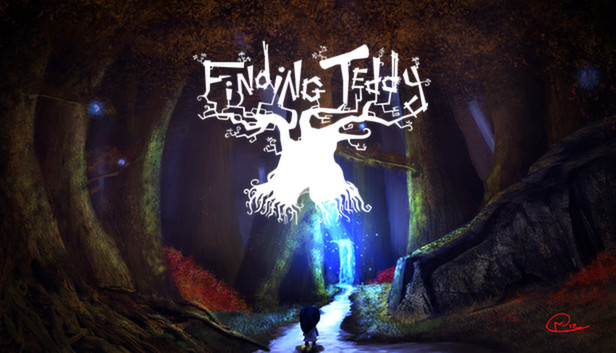
Finding Teddy is a Retro Point'n'click Interactive Tale.
A little girl was sleeping peacefully with her Teddy bear, when suddenly, a monster popped out from her cupboard then stole her favorite plush. When closing the door, the little girl awoke then got inside the cupboard. She's projected in a magical world, full of monsters and oddities where she has to discover the place and help their beings and find back her Teddy.
Still one question remain : will she be able to go back to the real world ?
The little girl : She's the main character, she's looking for her Teddy bear.
Mister Fly : Very useful fly to access some items where the little girl can't go. Verycourteous.
Mister Cat : Has a bad temper, nevertheless useful to access small places and narrow galleries. Just need to scratch its back.
In a very traditional point'n'click way, the inventory is very easy to use. Just drag'n'drop the items where you want. You can also click everywhere on the screen to interact with the environment. You will meet two characters who'll help you in your periple. You can save the game anytime, if you get killed, you'll go back to the same place, no need to load your game. No dialogue. Riddles are the main point of the game.
The revival of Point'n-Click.
Graphics completely handmade, realized pixel by pixel.
An adventure divided into three chapters including dozens of riddles with multiple side quests.
windows Minimum
OS: Windows 7+
Processor: Dual Core CPU
Memory: 512 MB RAM
Graphics: OpenGL 2.0 compliant video card
Storage: 90 MB available space
macosx Minimum
OS: Mac OS X 10.6
Processor: Dual Core CPU
Memory: 512 MB RAM
Graphics: OpenGL 2.0 compliant video card
Storage: 90 MB available space
linux Minimum
OS: Ubuntu Linux 12.10
Processor: Dual Core CPU
Memory: 512 MB RAM
Graphics: OpenGL 2.0 compliant video card
Storage: 90 MB available space
To activate the game, you need a Steam Account
Login or register at the official Steam Website and download Steam client
Install and start application, login with your Account name and Password
Click the Games Menu.
Choose Activate a Product on Steam...
Follow the onscreen instructions to complete the process
After the successful code verification, go to the "MY GAMES" tab and start downloading.
News & Updates
2025-07-09
Little Nightmares III: Terrifying New Worlds Revealed in Latest Showcase
Welcome back, little Visitor. It has been some time since you were last in this grim world, but we are delighted to see you return to the Spiral, eager to uncover the secrets behind one of the most haunting amusements that you are going to encounter in the upcoming Little Nightmares III release, since this time is a bit more mysterious, but still very much an atmospheric adventure game that would take you on the rather dark and twisted journey…
We are already at the end of the second quarter for the year and the summer is already giving us so many updates and cool information on a lot of gaming titles and events. We tried our best to gather some of the more exciting pieces, although it is quite difficult to contain everything in just one single post as there is simply so much to talk of. We kick-off things with as many of the highlights from one of the most important gaming events of the year…